Showing posts with label Into Tech. Show all posts

Bypass YouTube age restrictions and ads without extensions in just 2 steps.

Leave a Comment
YouTube, the video sharing super gaint is one of the websites which is used daily by many . Or take
video sharing to a whole different level and has a lot of awesome features but becomes annoying sometimes.

Doesn't it feel annoying when you click upon a video while browsing in a cyber cafe and this message shows up:

How to Insert Rupee Symbol(₹) on Android?

3 comments
 Insert Rupee Symbol on AndroidIt was on 15 July 2010 that the '₹' was adopted as symbol for Indian rupee and was expected be adopted within six months in the country, and within 18 to 24 months globally. But needless to say people still have have not stopped using 'Re', 'Rs' or 'INR' yet and the major reason for this is inaccessibility and lack of awareness. While on PC we can employ different methods like installing a font, copy-paste, or using unicode but the same is not so easy on smartphones. So, here are the ways to get it on Android.

Google Keyboard

Using language English(India).

  1. Download and install the latest version of the Google Keyboard from here.
  2. Go to Settings > Language & Input > Google Keyboard Settings > Input Languages and select English (India).
  3. Open any note app so that the keyboard pops up and press ?123 button. And voila, you can see the rupee symbol there.
'₹' on Google Keyboard: English(India)

Using default/Automatic/English (US/UK)

 Insert Rupee Symbol on Android using google keyboard english US
  1. Follow the above steps.
  2. Type '₹' somewhere and copy it
  3. Switch back to English.
  4. Navigate to Settings > Language & Input > Personal dictionary > English(UK or US whichever you use.) Press '+' button to add.
  5. Paste '₹' into 'PHRASE' field, and enter 'rupee' into shortcut field.
  6. Whenever 'rupee' is typed, '₹' appears as a suggestion.

 Insert Rupee Symbol on Android using google keyboard english US
'₹' appears as a suggestion. when rupee is entered.

Google Hindi Input

All that needs to be done is to download Google Hindi Input here and Install it. Then, when the keyboard is being used, press ?१२३ to get into symbols keyboard where the '₹' can be found. The only letdown is that this doesn't support continuous input/gesture typing.
 Insert Rupee Symbol on Android using google hindi input.
'₹' on Google Keyboard: English(US)

Swiftkey

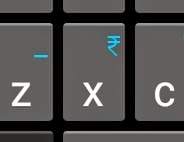
 Insert Rupee Symbol on Android using swiftkey
'₹' over 'x' on swiftkey
Swiftkey is regarded as one of the best keyboards for Android and falls in the category of editors pick on Google Play. Just follow the steps.
  1. Download and install swiftkey from here.
  2. Set the system language to English India.
  3. Now the keyboard shows '₹' over on the 'x' button.

Anysoft Keyboard

This is one of the simplest, clutter-free and lightest solution to the problem. But this also lacks continuous input/gesture typing.
  1. Just Download and install Anysoft Keyboard from here
  2. Get get into symbols layout on keyboard using '?' button. 
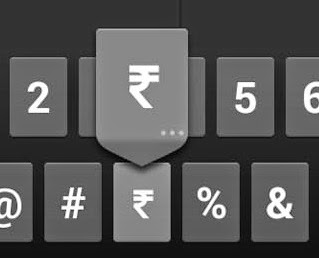
  3. Long- tap on '$' to get a popup containing the '₹' symbol.
 Insert Rupee Symbol on Android using anysoft keyboard
'₹' expanded from '$' on Anysoft keyboard.

CyanogenMod Stock Keyboard

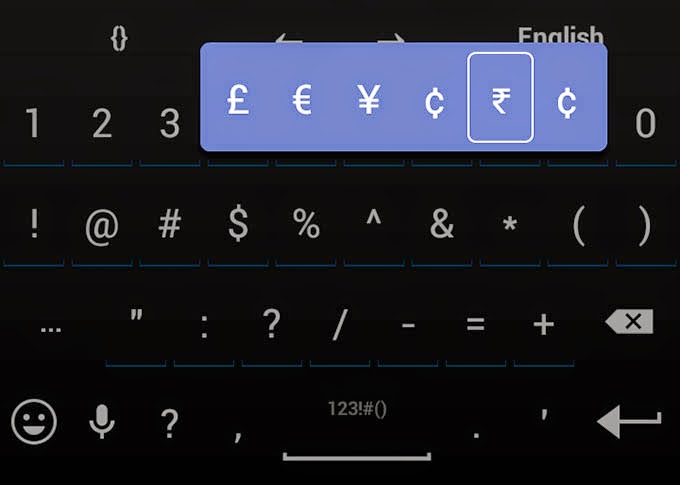
If you are using CyanogenMod 10 or later, the stock CyanogenMod Keyboard has this by default. After getting into the symbols layout just long tap '$' and you get a popup containing the '₹' symbol.
 Insert Rupee Symbol on Android using cyanogenmod stock keyboard
'₹' expanded from '$' on CyanogenMod Stock keyboard.

Pause a Download on PC and Resume it on a Smartphone.

1 comment
Downloaded 90% of a big file and you need to shut down the system because you are going out but still want to continue the download on the go? Or the download was simply interrupted due some connectivity problems? Well, that's quite depressing and may encourage you to go out and suicide instead of starting it all afresh but don't worry as there is a workaround and all you need is just Firefox browser for whatever platform(s) you are going to implement this on.

Stop paying too much for a Smartphone!

Leave a Comment
It all comes from the philosophy of this idiom "Why buy a cow when milk is so cheap?". Well, there are two kinds of people. Those who think thrice before spending money on anything and those who don't. Those who buy iPhones are an example of later kind. And  I am an example of former kind. And for the former kind the philosophy of this idiom is absolutely logical and reasonable because they are the people who say, "Money doesn't grow on trees".
Stop paying too much for a Smartphone!

So here are some smartphone suggestions (arranged in deceasing order of Bang to Buck Ratio) which will provide you the best experience at any price you can shell out without letting the purchase burn a hole in your pocket.

[WTF]Court orders to block 472 Websites? Workarounds are here

1 comment
Department of Telecom (DoT) has issued Court order to block a number of BitTorrent sites including Vimeo, GoogleDocs, goo.gl, KickAssTorrents, The Pirate Bay, Torrentz, etc to stop piracy and many ISPs have implemented the orders.

Well, we are among those who think free and open internet should be our birthright. We know our rights, what is illegal and we strive not to violate them in any form. But due to all the pirates around we are also facing this irrational blockage. There are legitimate torrents of software especially open source which depend on torrent mode. Vimeo is where small film makers can share there creative works. While goo.gl is just a URL shortening service Sites like Google Docs is used by a large number of people for their daily work.

So here is a list of some workarounds to overcome this silly ban and resume work.

Tor/Tails

Tor is a network of virtual tunnels that allows users their privacy and security on the Internet. It bounces your connection over a network of computers to build an encrypted circuit and thereby protects you from snooping. And thus all the blocked sites can be accessed